Website prayer times
Prayer times on your masjid's website that update themselves

Why it matters
The website still shows last month's times
On many masjid websites the prayer times are a picture or a PDF that someone has to replace by hand. When that person is busy, the website shows the wrong jamaat and people turn up at the wrong time.
A widget reads your times straight from MasjidConnect, so nobody has to edit the website again.
The widgets
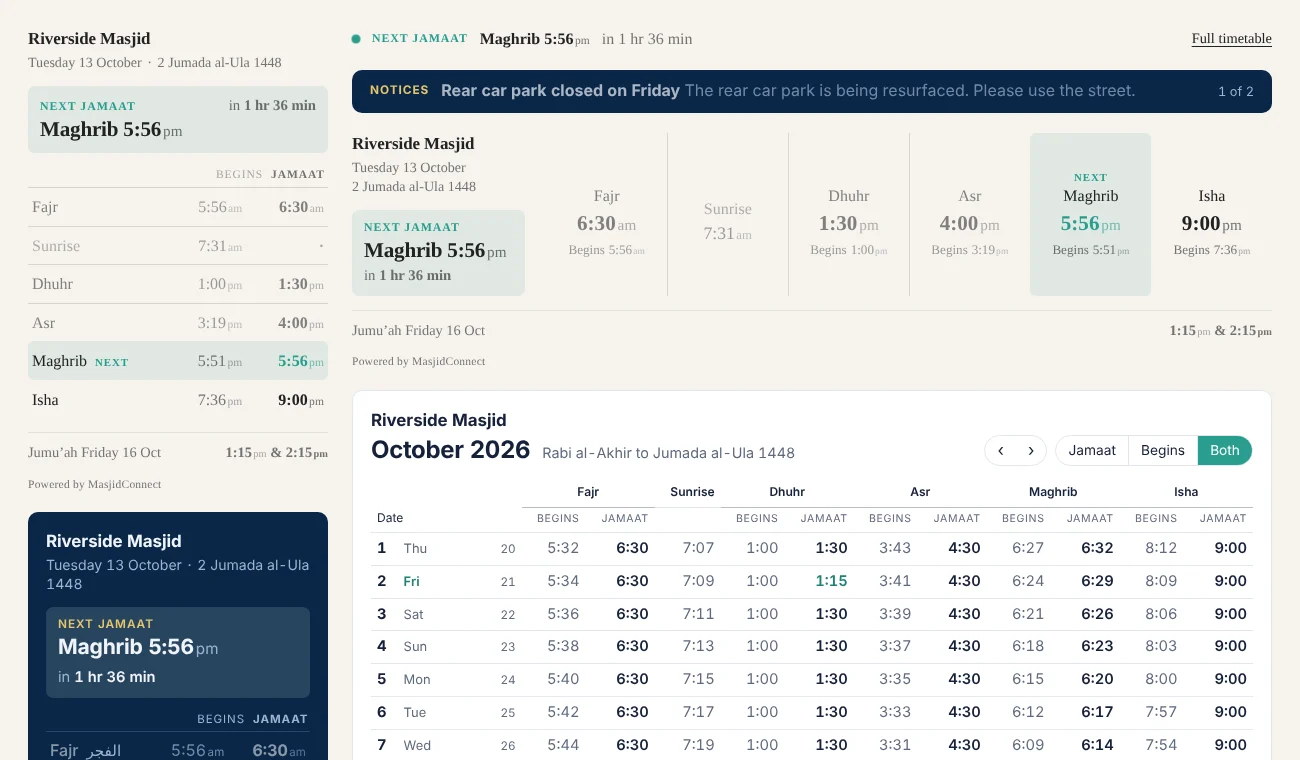
Today's prayer times shows start and jamaat times for today, with the next jamaat picked out. It suits a homepage or a sidebar.
Monthly timetable shows the whole month in a table. Today is picked out, jamaat times are underlined on the day they change, and visitors can move between months and print or save the month as a PDF.
Next jamaat is one line, or a card with a countdown, for a website header or footer. Jumu'ah shows this Friday's khutbah and jamaat times, with a short note such as where to park. Notices shows your live announcements as a list or a one-line bar.
You paste the code once, and it works on most website builders, including WordPress and Wix. If your website won't run scripts, there is an iframe version, and a link you can share on Facebook or WhatsApp.
What the widgets look like
These are the real widgets on a website. They can match your website's font and colours, or sit in a light or navy card.
- 01
Paste once
Copy the code from the portal and paste it into your website.
- 02
Always up to date
Jamaat changes, Jumu'ah and Ramadan times all come through by themselves.
- 03
Free to start
Today's prayer times and the monthly timetable are on the Free plan.
- 04
More with a licence
Up to 10 widgets of every kind, your own colour and no MasjidConnect name.
From a masjid that uses it
The product can adapt to the needs of the masjid rather than the masjid having to adapt to the software.
“In my experience, MasjidConnect represents very good value for money, particularly when you take into account the functionality, flexibility and excellent customer support.”
Website prayer times questions
How do I add prayer times to my masjid's website?
Add your times to MasjidConnect, open Website widgets, pick a widget and copy the code. Paste it into your website once. From then on the widget shows your current times by itself.
Does it work with WordPress or Wix?
Yes. It works on most website builders, including WordPress and Wix. If your website won't run scripts, use the iframe version shown under the code.
Is the prayer times widget free?
Yes. The Free plan includes two widgets, Today's prayer times and the Monthly timetable, with "Powered by MasjidConnect" underneath. The Masjid licence adds every widget, your own highlight colour and no MasjidConnect name.
Will it show our jamaat times, not just start times?
Yes. The widgets show your start and jamaat times as they are in the portal, including Jumu'ah. Change a jamaat time and the website follows within a few minutes.
We don't have a website. Can we still share our times?
Yes. Each widget has a link and a QR code that open it on a page of its own, which you can share on Facebook or WhatsApp.
Put your times on your website today
Start free, add your timetable, and copy the code into your website.
No monthly fees, ever