Printed timetables
Print your masjid's prayer timetable without retyping it
Why it matters
Retyping the timetable every month
Many masjids still build the monthly timetable by hand in Word or Excel, copying each start and jamaat time across. It takes an evening, and one wrong number means a reprint.
When the times change, the screen and the paper on the notice board stop matching. A timetable made from the same times as the screen can't drift.
How it works
Add your prayer times once: upload the timetable you already use, let us work out start times for your area, or type them in. The timetable maker reads from those times.
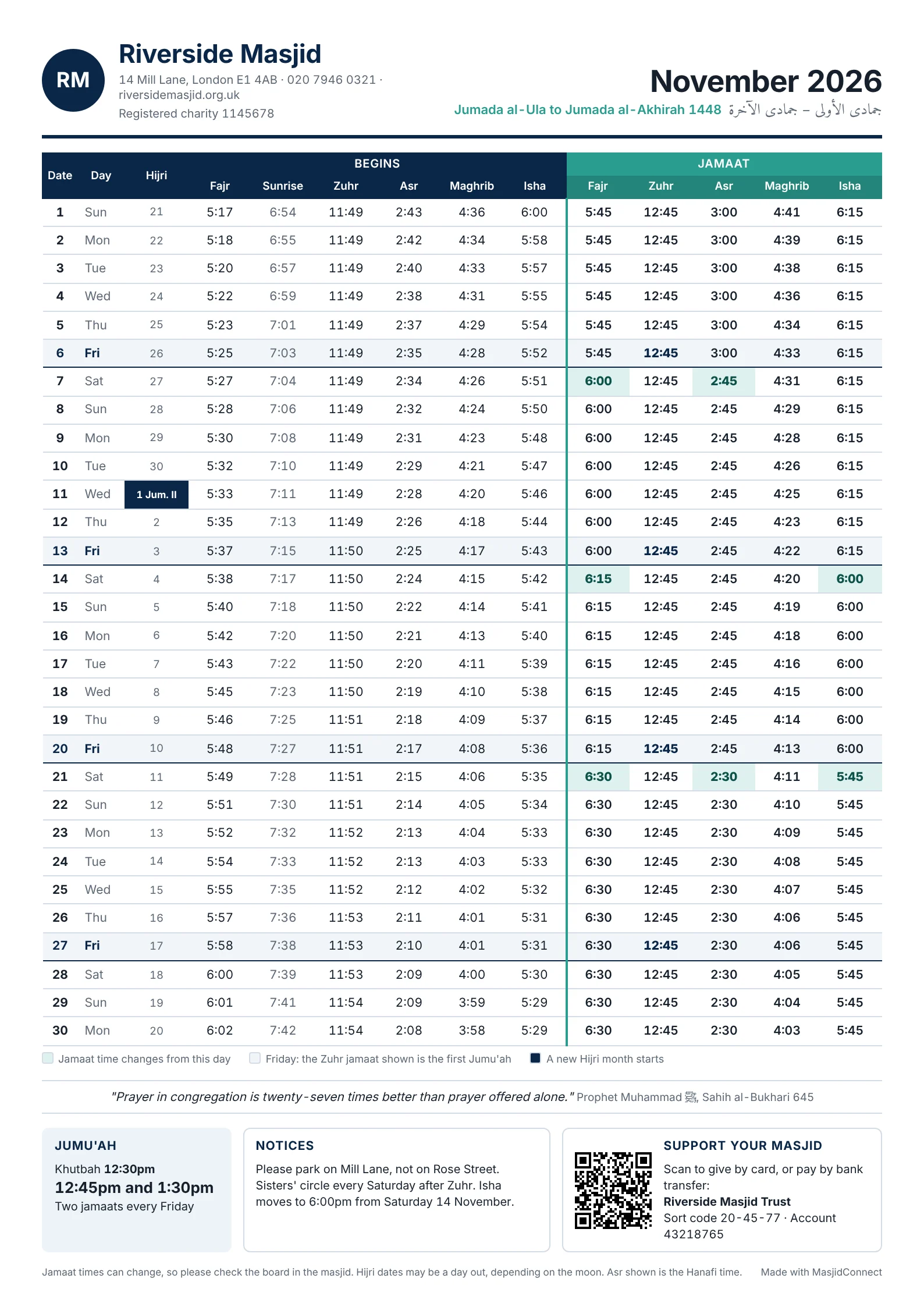
Pick a design. Classic suits most masjids. Easy read has big jamaat times for the notice board. Week by week puts each week's jamaat times on one line. Ramadan picks the Ramadan dates by itself, and Whole year fits the year on one page.
Choose what goes on the page, such as sunrise, Hijri dates, your logo and address, Jumu'ah times, a notice, ways to give, a hadith and local sponsors. Then download a colour PDF, a black and white PDF that is cheaper to photocopy, or a picture for WhatsApp.
The Free plan makes a monthly timetable in the Classic design. The Masjid licence adds every design, including Ramadan and whole-year timetables.
Timetables that match your screens
Each download is made fresh from your current times, so a jamaat change only has to be made once.
- 01
PDF or WhatsApp picture
Print it for the notice board or send it round the groups.
- 02
Ramadan timetable
Covers the whole of Ramadan, even across two months, with room for Eid jamaat times and the Zakat al-Fitr amount.
- 03
Your details on it
Logo, address, bank details and a QR code to your donate page.
- 04
Several months at once
Make the next few months in one go.
From a masjid that uses it
The product can adapt to the needs of the masjid rather than the masjid having to adapt to the software.
“In my experience, MasjidConnect represents very good value for money, particularly when you take into account the functionality, flexibility and excellent customer support.”
Prayer timetable questions
How do I make a prayer timetable for my masjid?
Add your prayer times to MasjidConnect by uploading the timetable you use, letting us work them out for your area, or typing them in. Then open Printed timetables, pick a design and press Download. You get a PDF to print or a picture for WhatsApp.
Can I make a Ramadan timetable?
Yes, with a Masjid licence. The Ramadan design picks the Ramadan dates by itself, covers the whole month even when it runs across two calendar months, and has space for your Eid jamaat times and the Zakat al-Fitr amount.
Can we print it in black and white?
Yes. Choose the black and white PDF, which is cheaper to photocopy, or the colour PDF.
Does it show our own jamaat times?
Yes. The timetable uses your start and jamaat times exactly as they are in the portal, including Jumu'ah. If you change a jamaat time, download the timetable again to get the new version.
Is the timetable maker free?
The monthly Classic timetable is on the Free plan. The other designs, the Ramadan timetable and the whole-year timetable come with the Masjid licence, which is £499 once.
Can people see the timetable on our website?
Yes. The monthly timetable website widget shows the same times on your own website, and visitors can print it or save it as a PDF. It is on the Free plan.
Make this month's timetable
Start free, add your times and download your first timetable today. No card needed.
No monthly fees, ever